 国際教養大学公式サイト


FAQ
FAQ(English)
I want to be notified of any books related to _____ received by the library. Is this possible?
カテゴリ:
5.1. Personal Services
when the library receives any matching material.
After a search with [AIU Catalog], you can register the search conditions by clicking "Add Search Alert."
You can also register search conditions from Alert.
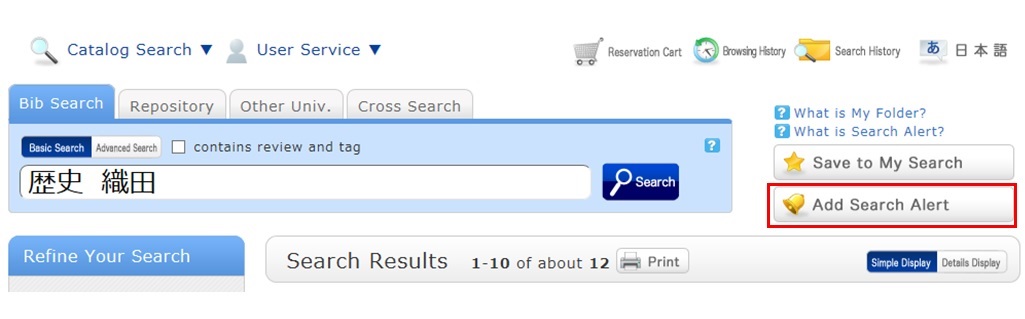
The process of registration displays the Alert list screen.
From there, you can check the list being sent and change the sending frequency.
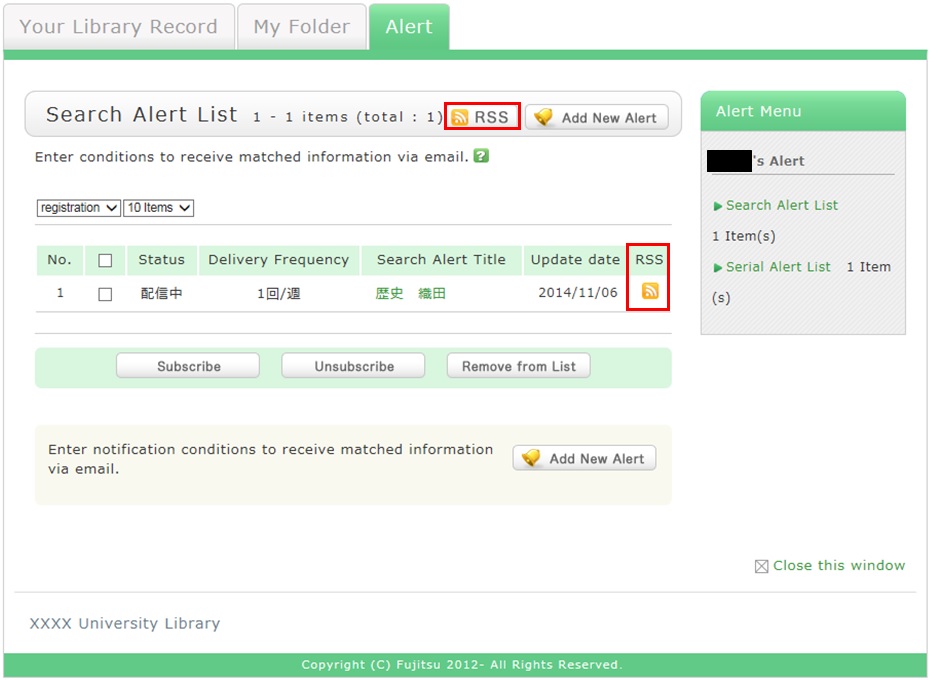
You can register an RSS reader from the [RSS] button.
Once you have registered the RSS reader, you can check for any new arrivals of the relevant materials,
even without checking OPAC.
★I have a book I want to sell.
★I want to express a question, opinion, or request to the library.
What is OPAC?
カテゴリ:
9. Other
OPAC is the abbreviation for Online Public Access Catalog.
Nakajima Library website offers functions of OPAC.
★What do I do when I don't find the materials I'm looking for on the [Bib Search] tab? (Part 1)
- check the Kanji and spelling of keywords to see whether they are correct.
- Are searching by "Article title" or "Article author"? Try searching by serial title.
When you want to search by "Article title" or "Article author," try searching from the [ONE-Search] tab. In such cases, you may also be able to read the text of electronic journals from a personal computer. - If you still do not find the materials you are looking for, try searching from the [Other Univ.] tab.
If you can confirm that the library of another institution possesses the materials you are looking for, you may be able to get them from the library.
Opening Hours
| 日 | 月 | 火 | 水 | 木 | 金 | 土 |
29 | 30 | 31 | 1 | 2 | 3 | 4 |
5 | 6 | 7 | 8 | 9 | 10 | 11 |
12 | 13 | 14 | 15 | 16 | 17 | 18 |
19 | 20 | 21 | 22 | 23 | 24 | 25 |
26 | 27 | 28 | 29 | 30 | 1 | 2 |


Access from Cellular Phone