 国際教養大学公式サイト

FAQ
FAQ(English)
What kind of user services are available?
カテゴリ:
5.1. Personal Services
The user services offered are broadly divided into the following three functions.
1. My Library Record
Use this function to browse your current borrowing status, apply for an extension of the borrowing period, and change data such as personal information.
2. My Folder
This function is used to save search conditions, save search results, and browse the history.
3. Alert
This function notifies you of the arrival of new books and serials at the library.
I can't log in to Library website.
カテゴリ:
5.1. Personal Services
What can I do from Your Library Record in the Library website?
カテゴリ:
5.1. Personal Services
Renewal and export to the book management tool are both possible from the list. To do so, enter a check mark in each appropriate check box.
Click a bookmark title to check the status in detail.
Reservation
Canceling a reservation, deleting one from the list, and export to the book management tool are all possible from the list. To do so, enter a check mark in each appropriate check box.
Click a bookmark title to check the reservation status in detail.
Copy request
Canceling a copy request, deleting one from the list, and export to the book management tool are all possible from the list. To do so, enter a check mark in each appropriate check box.
Click a bookmark title to check the status in detail.
Borrowing request
Canceling a borrowing request, deleting one from the list, and export to the book management tool are all possible from the list. To do so, enter a check mark in each appropriate check box.
Click a bookmark title to check the request status in detail.
Purchase request
Deleting a request from the list and export to the book management tool are both possible from the list. To do so, enter a check mark in each appropriate check box.
Click a bookmark title to check the purchase status in detail.
Borrowing history
Deleting an item from the list and export to the book management tool are both possible from the list. To do so, enter a check mark in each appropriate check box.
Click a bookmark title to check the borrowing history in detail.
What kind of functions does My Folder have?
カテゴリ:
5.1. Personal Services
1. Bookmark
This function creates a list of materials on the Web. You can register the books you have already read or plan to read.
The list can also be used as a list for outputting data to EndNote and RefWorks.
2. My Search
This function saves search conditions. So you can perform your next and subsequent searches using the same search conditions.
Can I have a list of materials kept for me to check at a later date?
カテゴリ:
5.1. Personal Services
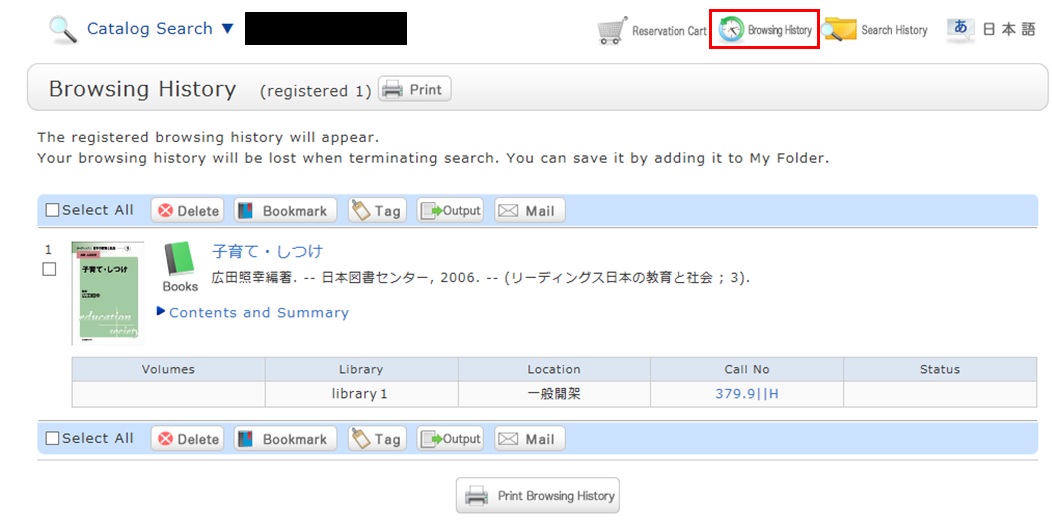
* The screenshot is the screen displayed after "Browsing History" is clicked.
To confirm content at a later date, register it in a bookmark.
Register it in the bookmark from the search result list or the bibliography details screen.
To register a material on the list screen, enter a check mark in the check box of the material, and click the [Bookmark] button.
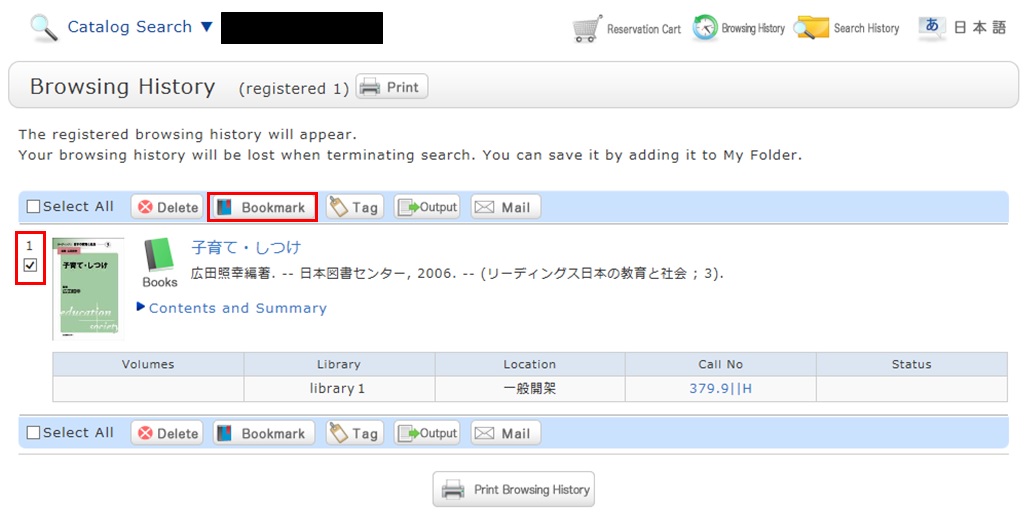
You can check the registered contents from the bookmarks.
Opening Hours
| 日 | 月 | 火 | 水 | 木 | 金 | 土 |
29 | 30 | 31 | 1 | 2 | 3 | 4 |
5 | 6 | 7 | 8 | 9 | 10 | 11 |
12 | 13 | 14 | 15 | 16 | 17 | 18 |
19 | 20 | 21 | 22 | 23 | 24 | 25 |
26 | 27 | 28 | 29 | 30 | 1 | 2 |


Access from Cellular Phone