

 国際教養大学公式サイト


FAQ
How do I import book information from [AIU Catalog] to RefWorks?
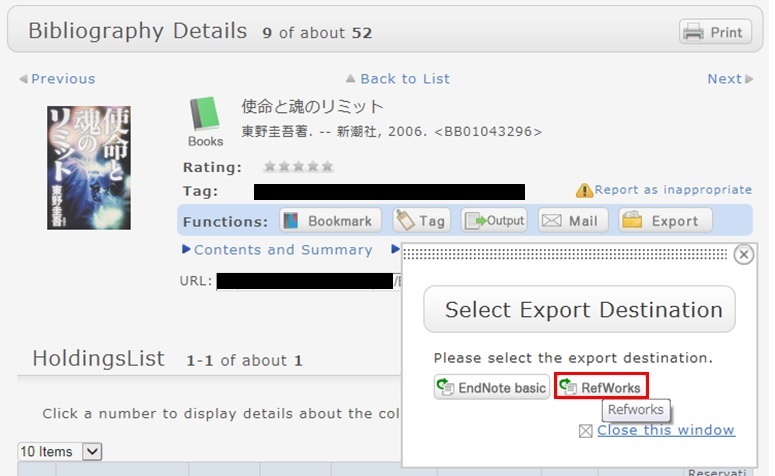
- You can import book information from OPAC to RefWorks from the following screen.
- You can import book information directly (direct import) to RefWorks.
- Register as a new user only the first time.
- Click "Book Management" on the bibliography search result list screen or bibliography details screen.
(The bibliography to be imported must be selected on the bibliography search result list screen.) - The "Select Export Destination" pop-up appears. Select "RefWorks."
- The selected bibliography is imported to RefWorks. (If you have not logged in yet, the login screen appears. In that case, enter your login name and password.)
Reference:
RefWorks (SUNMEDIA)
サイト内検索
利用者サービス
お役立ちツール
- Google Scholar Setting Guide pdf
- Book request pdf
- Renewing books pdf
- Grammarly(英文校正ツール) pdf
- RefWorks ログイン
- RefWorks ユーザーガイド
- Wireless LAN on campus
おすすめのタグ
- 2026 Recommended books by AIU Faculty for new students
- 2026 Career and Life
- Selected by GC faculty 2025
- Selected by GB faculty 2025
- Selected by ELT faculty 2025
- 2025 Diversity and Inclusion
- Selected by GS faculty 2025
- 2024 CHOICE Outstanding Academic Titles
- 2025 Your Best Books/AIU生おすすめの本展
- 2025 Study Abroad Fair