

 国際教養大学公式サイト


FAQ
FAQ(English)
How do I cancel a submitted copy request (ILL copy request)?
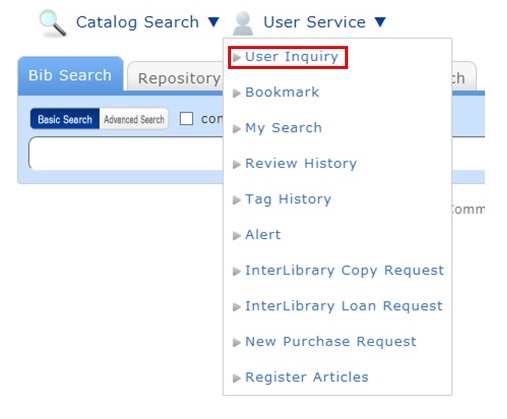
You can confirm your loaned out materials and various requested materials on the user inquiry screen.
Select "Go to Copy Request List" in the information relating to copy requests, among those requests.
As a result, you can check a list of the copy requests that are current requests.
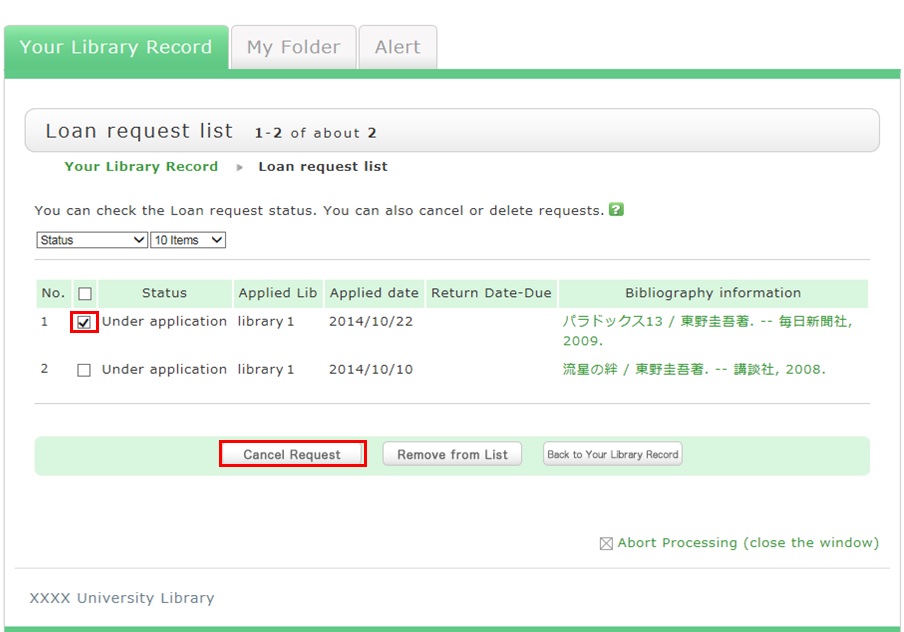
If you want to cancel the request for a material in this list, place a check mark beside the material and click the [Cancel Request] button.
サイト内検索
利用者サービス
お役立ちツール
- Google Scholar Setting Guide pdf
- Book request pdf
- Renewing books pdf
- Grammarly(英文校正ツール) pdf
- RefWorks ログイン
- RefWorks ユーザーガイド
- Wireless LAN on campus
おすすめのタグ
- 2026 Recommended books by AIU Faculty for new students
- 2026 Career and Life
- Selected by GC faculty 2025
- Selected by GB faculty 2025
- Selected by ELT faculty 2025
- 2025 Diversity and Inclusion
- Selected by GS faculty 2025
- 2024 CHOICE Outstanding Academic Titles
- 2025 Your Best Books/AIU生おすすめの本展
- 2025 Study Abroad Fair