

 国際教養大学公式サイト


FAQ
I want to save search conditions to use in a search at a later date. Can this be done?
カテゴリ:
5.1. Personal Services
You can check the search history by clicking the [Search History] button at the top of the screen.
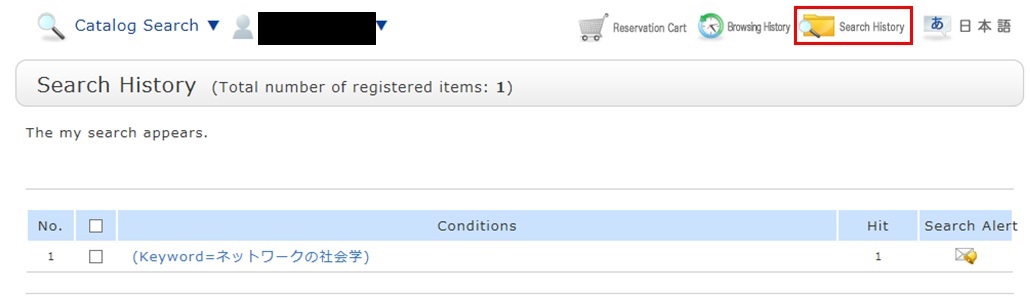
* The screenshot is the screen displayed when "Search History" is clicked.
To save search conditions until a later date by registering them from the search history browsing screen, enter a check mark in the check box of each search condition, and click the [Add to Favorites] button.
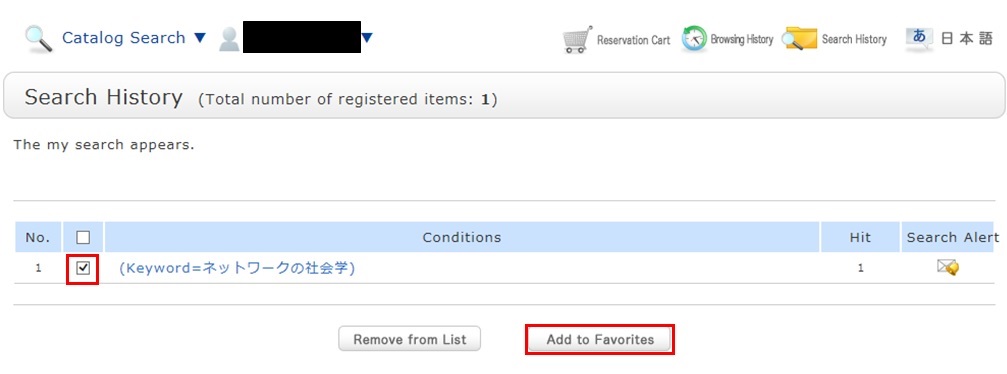
You can check the registered contents from My Search in OPAC.
サイト内検索
利用者サービス
お役立ちツール
- Google Scholar Setting Guide pdf
- Book request pdf
- Renewing books pdf
- Grammarly(英文校正ツール) pdf
- RefWorks ログイン
- RefWorks ユーザーガイド
- Wireless LAN on campus
おすすめのタグ
- 2026 Recommended books by AIU Faculty for new students
- 2026 Career and Life
- Selected by GC faculty 2025
- Selected by GB faculty 2025
- Selected by ELT faculty 2025
- 2025 Diversity and Inclusion
- Selected by GS faculty 2025
- 2024 CHOICE Outstanding Academic Titles
- 2025 Your Best Books/AIU生おすすめの本展
- 2025 Study Abroad Fair